/*******************************************************************
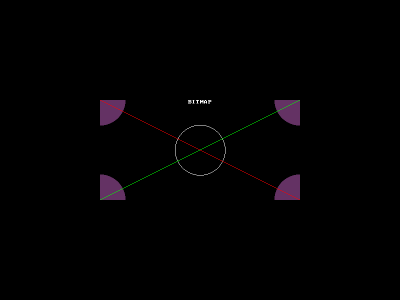
BITMAP : rectangle image (visible ou en mémoire)
        - Déclaration BITMAP *
        - Création, allocation dynamique avec create_bitmap
        - Dessiner dessus (primitive de dessin et textes)
        - Montrer à l'écran avec blit

Appuyer sur
        - Espace pour effacer l'écran (screen)
        - Entrée pour (ré)afficher la BITMAP à l'écran
        - Gauche/Droite pour bouger la BITMAP
        - Echap pour sortir
*******************************************************************/

#include <allegro.h>

int main()
{
    // Déclaration d'un pointeur sur une structure BITMAP
    BITMAP *bmp;

    // Sur cet exemple : position de la Bitmap à l'écran
    int x,y;

    // Lancer allegro et le mode graphique
    allegro_init();
    install_keyboard();

    set_color_depth(desktop_color_depth());
    if (set_gfx_mode(GFX_AUTODETECT_WINDOWED,800,600,0,0)!=0)
    {
        allegro_message("prb gfx mode");
        allegro_exit();
        exit(EXIT_FAILURE);
    }

    // Allocation dynamique d'une structure BITMAP de 400 par 200
    bmp=create_bitmap(400,200);

    // Comme pour un malloc on peut tester si il n'y a pas de problème
    // (souvent sur un simple create_bitmap on ne le fera pas)
    if (!bmp)
    {
        allegro_message("prb allocation BITMAP bmp");
        allegro_exit();
        exit(EXIT_FAILURE);
    }

    // Effacer contenu éventuel qui traine en mémoire
    // -> tous les pixels sont mis à noir
    clear_bitmap(bmp);

    // DESSINER DANS LA BITMAP... on utilise bmp en 1er parametre

    // Cercle blanc au centre
    circle(bmp,200,100,50,makecol(255,255,255));

    // Disques violets dans les coins
    circlefill(bmp,0,0,50,makecol(100,50,100));
    circlefill(bmp,399,0,50,makecol(100,50,100));
    circlefill(bmp,0,199,50,makecol(100,50,100));
    circlefill(bmp,399,199,50,makecol(100,50,100));

    // Lignes rouges et vertes en diagonales
    line(bmp,0,0,399,199,makecol(255,0,0));
    line(bmp,399,0,0,199,makecol(0,255,0));

    // Un peu de texte centré
    textprintf_centre_ex(bmp,font,200,0,makecol(255,255,255),-1,"BITMAP");


    x=(SCREEN_W-bmp->w)/2;
    y=(SCREEN_H-bmp->h)/2;

    // Affichage de la Bitmap sur l'écran à ces coordonnées
    blit(bmp, screen, 0,0, x, y, bmp->w, bmp->h);

    // boucle d'événements, fin si touche escape appuyée
    while (!key[KEY_ESC])
    {
        // si touche ESPACE effacer l'écran (mais pas la BITMAP bmp)
        if (key[KEY_SPACE])
            clear_bitmap(screen);

        // si touche ENTREE réaffiche la BITMAP bmp à l'écran
        if (key[KEY_ENTER])
            blit(bmp, screen, 0,0, x, y, bmp->w, bmp->h);

        // si touche GAUCHE réaffiche la BITMAP bmp à l'écran un cran à gauche
        if (key[KEY_LEFT])
        {
            rectfill(screen,x,y,x+bmp->w,y+bmp->h,makecol(0,0,0));
            x--;
            blit(bmp, screen, 0,0, x, y, bmp->w, bmp->h);
        }

        // si touche DROITE réaffiche la BITMAP bmp à l'écran un cran à droite
        if (key[KEY_RIGHT])
        {
            rectfill(screen,x,y,x+bmp->w,y+bmp->h,makecol(0,0,0));
            x++;
            blit(bmp, screen, 0,0, x, y, bmp->w, bmp->h);
        }

        // petite pause pour cadencer les mouvements (pas trop vite)
        rest(20);
    }

    // libérer la mémoire de la BITMAP quand on ne l'utilise plus (à la fin)
    destroy_bitmap(bmp);

    return 0;
}
END_OF_MAIN();